 How Can We Help?



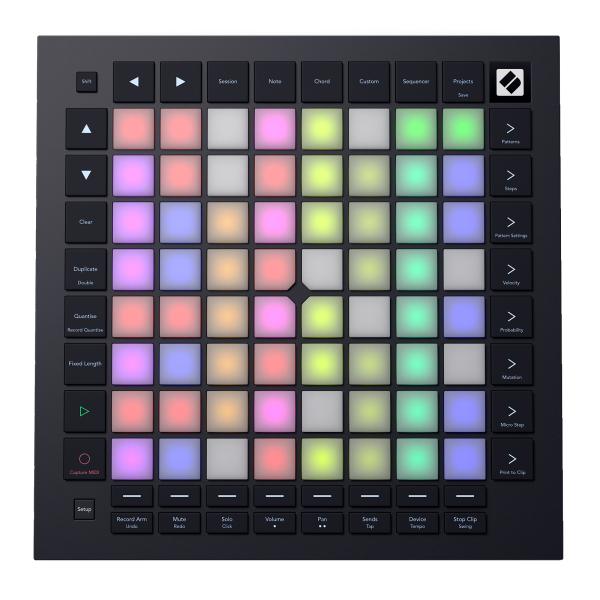
Novation Launchpad Pro MK3 64-Pad Performance Controller for Ableton
$389.99
Reg.
You save
In Stock | Free Shipping
Key Highlights
- Go deeper with Ableton Live
Build tracks, jam ideas, or perform with clips and scenes. Plus access mixer, device and transport controls, and quantize, duplicate and double - no mouse needed. - Powerful DAW integration
Launchpad Pro is also designed to give you control over your workflow in Logic Pro, Bitwig, Ardour, and more. - A hub for all your hardware
With MIDI In, Out, and Out 2/Thru connections, it's easy to connect and control your hardware synths using Launchpad Pro's built-in Sequencer, Note, Chord, Custom, and Programmer modes. - 64 velocity-sensitive RGB pads
The 64 velocity-sensitive RGB pads with polyphonic aftertouch are a perfect reflection of your DAW session, making it easy to see your clips and play software or hardware instruments expressively.
Get Expert Help Before You Buy
Get fast answers on setup, compatibility, and system matching.
✔ No pressure. Just real help.
Your request was saved successfully.
|
Launchpad Pro is the hands-on hub for your entire workflow, from your DAW and plugins to hardware synths and effects. In the studio or on stage, its 64 polyphonic-aftertouch pads seamlessly switch between launching clips, playing and editing notes and drum patterns, mixing, sequencing, and controlling your setup with Custom Modes - with or without a computer connected. Alongside deep Ableton Live integration, Launchpad Pro works intuitively with Logic Pro, Bitwig, Ardour, and more. Launchpad, a legendary line of grid controllers, has always been about getting you hands-on with your sound. The original, released back in 2009 in collaboration with Ableton, spawned an entire genre of mashups, remixes, and original productions overnight. Today, the Launchpad range has evolved to power all sorts of setups - in the studio, on stage, and on the go with the Launchpad app for iPhone and iPad. Thanks to extra dedicated controls, Launchpad Pro is Novation's ultimate grid controller for Ableton Live. It's ideal for building tracks, jamming out ideas, and perform live by launching clips and scenes in Session Mode. You can also access mixer, device and transport controls directly, and quantize, duplicate and double without reaching for the mouse. And with Capture MIDI, you'll never lose a good idea again. Launchpad Pro also pairs perfectly with Logic Pro, Bitwig, Ardour, and more. Step outside the box or embrace hybrid workflow with MIDI In, Out, and Out 2/Thru connections. Launchpad Pro makes it easy to connect and control your hardware synths with the built-in Sequencer, Note, Chord, Custom, and Programmer modes, then tie it all together with your DAW workflow should you choose. Launchpad Pro's 64 RGB pads let you know exactly what's happening with your DAW's clips and scenes and allow you to create arrangements on the fly. You also get direct access to Stop, Solo, Mute and Record Arm controls, and can even transform your pads into a tactile control surface for adjusting track volumes, pans, sends, and more. Launchpad Pro features a four-track, eight-note polyphonic, 32-step standalone sequencer. It allows real-time step recording, pattern chaining, and scene triggering for both software and hardware instruments. You also get Micro Steps to take grooves off-grid and Probability, Mutation, Sync Rate and Play Order controls to transform patterns on the fly. And Ableton Live users can instantly print their favorite patterns to clips.
No keyboard, no problem. Launchpad Pro's pads are velocity sensitive and feature polyphonic aftertouch. Note mode turns them into a highly expressive keyboard in either a chromatic or scale-based layout, and Chord mode makes it easy to explore, build, and save complex chords. You get four octaves of notes with the lowest in the bottom left and the highest at in the top right and, unlike a piano keyboard, scales and chord shapes remain the same in every key, making Launchpad especially easy to learn. Drum mode recreates a classic 4x4 drum-pad layout in a section of Launchpad Pro's grid, allowing you to play beats or trigger samples in real time. Velocity sensitivity and polyphonic aftertouch make it easy to add a human touch to your playing. Launchpad Pro is Novation's most fully featured grid controller to date, with dedicated buttons for starting and stopping playback and recording; arming, muting, and soloing tracks; instantly accessing mixer controls and more. Despite the extra on-board controls, it's still perfectly portable and slips easily into most backpacks. Plug it into your iPad or iPhone, and it's ideal for making music on the move with the Launchpad app. The Novation Components software lets you customize Launchpad Pro to fit perfectly into your unique setup, whether you work in a DAW, with hardware, or a combination of the two. Create a custom grid for your stage setup, a set of virtual faders for a favorite plugin, or a dedicated row of buttons for toggling effects, then lay it all out exactly the way you want. You can drag and drop Custom Mode widgets to create up to eight unique combinations that include keystrokes, faders, custom note modes, program changes, and MIDI CCs. Launchpad Pro comes with Ableton Live 12 Lite and Cubase LE, plus a suite of essential instruments and effects from Novation's partners. Novation's Easy Start guide is designed to get you up and running with your new hardware and software in no time at all, and 40 Launchpad-specific finger-drumming lessons from Novation's friends at Melodics are included at no extra cost.
Novation Launchpad Pro MK3 64-Pad Performance Controller Features:
- Go deeper with Ableton Live
Build tracks, jam ideas, or perform with clips and scenes. Plus access mixer, device and transport controls, and quantize, duplicate and double - no mouse needed. - Powerful DAW integration
Launchpad Pro is also designed to give you control over your workflow in Logic Pro, Bitwig, Ardour, and more. - A hub for all your hardware
With MIDI In, Out, and Out 2/Thru connections, it's easy to connect and control your hardware synths using Launchpad Pro's built-in Sequencer, Note, Chord, Custom, and Programmer modes. - 64 velocity-sensitive RGB pads
The 64 velocity-sensitive RGB pads with polyphonic aftertouch are a perfect reflection of your DAW session, making it easy to see your clips and play software or hardware instruments expressively. - Four-track, 32-step sequencer
Launchpad Pro's built in four-track, 32-step sequencer features eight-note polyphony per track and allows for real-time step recording, pattern chaining, and scene triggering for software or hardware instruments. - Dedicated controls for transport and essential DAW functions
Launchpad Pro has dedicated buttons for starting and stopping playback and recording; arming, muting, and soloing tracks; instantly accessing mixer controls; and more. - Play melodies, beats, and chords
Chromatic, Scale, and Drum layouts give you expressive control over your melodies and rhythms, while Chord mode allows you to play full, complex chords with a single pad. - Eight Custom Modes
Use Novation Components to drag and drop Custom Mode widgets into up to eight unique grid layouts with keystroke controls, bipolar and unipolar faders, user-defined note modes, Program Changes, and CCs. - Power meets portability
Launchpad Pro is big on creativity, but light on weight and fits in most backpacks. It's also bus-powered and works with the Launchpad app on iPad and iPhone for making music on the move. - Play right away
Novation's Easy Start guide will get you up and running with the included software, and you also get 40 Launchpad-specific finger-drumming lessons from Melodics at no extra cost. - Everything you need to create
Launchpad Pro comes with Ableton Live 12 Lite and Cubase LE, plus a suite of essential instruments and effects from Novation's partners.
Novation Launchpad Pro MK3 Product Specifications:
Product Hardware
Pads with Polyphonic Aftertouch: 64
Track Navigation Buttons: Up, Down, Left, and Right
Scene Launch and Sequencer Control Buttons: 8
Track Select Buttons: 8
Ableton Track Control Buttons: 8
Mode Buttons: 6
Connectivity: USB Type-C
Bus Powered: Yes
Kensington Security Slot
Software Compatibility
Launchpad Pro [MK3] is class compliant and will work with any recent Mac, Windows PC, or iOS device.
Power Requirements
USB power supply included
Single Hardware Unit Weight
2.21lbs (without accessories)
2.69lbs (with accessories)
Dimensions
0.71" x 10.55" x 10.55" (H x W x D)
Each Launchpad Pro MK3 Retail Box Includes:
(1) Novation Launchpad Pro MK3 64-Pad Performance Controller for Ableton
(1) 1.5m USB type C-to-A cable
(1) USB type C-to-C cable
(1) USB type A Power Adapter
(3) TRS Minijack to DIN MIDI Adapters
Included Software
Ableton Live Lite
Quickly organise and arrange your sounds and start making tracks with this staple electronic-music-making software.
Cubase LE
Get all the basic tools you need to record, edit and mix your projects - from initial ideas to finished tracks.
AAS Session Bundle
Three synths for music makers, providing staple sounds for your tracks.
XLN Addictive Keys
Add great sounding piano to your tracks with the Studio Grand, based on the iconic Steinway Model D.
Klevgrand DAW Cassette
High quality tape deck emulation plug-ins, to take your sound back to the golden age of cassette tapes.
Finger-drumming lessons from Melodics
Build your skills with 40 interactive finger-drumming lessons designed specifically for your Launchpad.
All other product names and brands cited herein are property of their respective owners. All company, product and service names used on this page are for identification purposes only. Use of these names, logos, and brands does not imply endorsement.